Studying at a prestigious institution like the National University of Sciences and Technology (NUST) in Pakistan can be both exciting and challenging. As one of the country’s top universities, NUST encourages students to excel in fields such as engineering, technology, and the sciences. However, with its unique grading approach, keeping track of your progress isn’t always straightforward. That’s where a reliable NUST GPA calculator comes in handy—it helps you figure out your semester grades quickly and plan.
If you’re new to NUST or just want to stay on top of your academics, understanding how to use a NUST GPA calculator is key. This tool takes the guesswork out of calculations, especially since NUST follows a relative system rather than fixed marks. In this article, we’ll break it down step by step, from the basics of the grading setup to practical tips and tools.
For more details on the university itself, check out the National University of Sciences and Technology on Wikipedia.
Understanding the NUST Grading System
NUST stands out because it uses a relative grading method on a 4.0 scale. Unlike some schools where an A might mean scoring above 85% no matter what, here your grade depends on how you perform compared to your classmates. This encourages healthy competition but can feel tough if everyone in your section is strong.
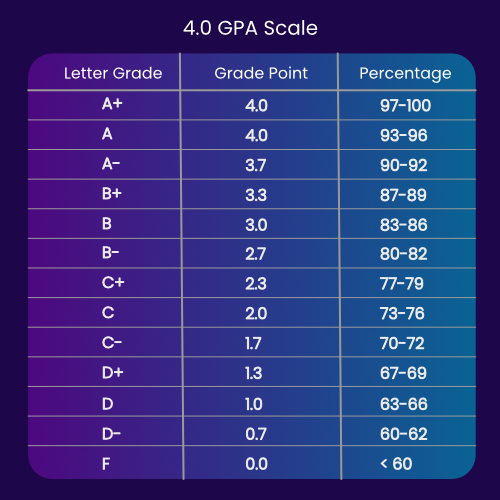
Typically, grades map like this:
- A: 4.0
- A-: 3.7
- B+: 3.3
- B: 3.0
- B-: 2.7
- C+: 2.3
- C: 2.0
- C-: 1.7
- D+: 1.3
- D: 1.0
- F: 0.0 (fail)
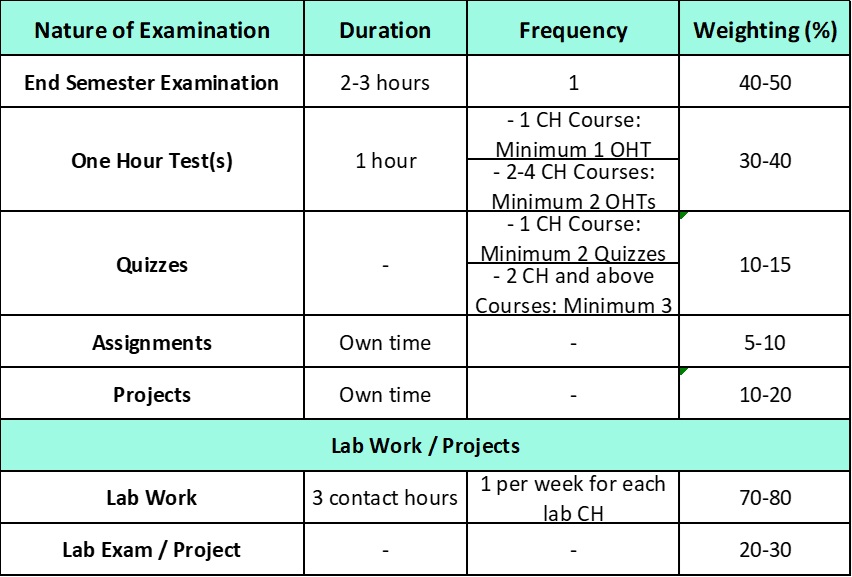
To pass a single course, you need at least 1.0 in it. For your overall degree, a minimum GPA of 2.0 is required. This setup rewards consistent effort across semesters.
Many students find relative grading motivating, as it adjusts for class difficulty. If a tough professor teaches and the whole group struggles, grades might curve favourably. On the flip side, in a high-achieving batch, even solid marks could land you a lower letter.
How to Calculate NUST GPA Manually
If you prefer doing things by hand or want to double-check an online tool, calculating your GPA is simple once you know the formula.
The basic equation for semester GPA is:
GPA = (Total Grade Points × Credit Hours for all courses) / Total Credit Hours
Here’s how it works:
- List your courses, their credit hours (usually 1-4 per subject), and your letter grade.
- Multiply the grade point by credits for each course.
- Add up those products.
- Divide by the sum of all credit hours.
Let’s say you took four courses in a semester:
- Physics (3 credits, A- = 3.7) → 3 × 3.7 = 11.1
- Math (4 credits, B+ = 3.3) → 4 × 3.3 = 13.2
- Programming (3 credits, A = 4.0) → 3 × 4.0 = 12.0
- English (2 credits, B = 3.0) → 2 × 3.0 = 6.0
Total points: 11.1 + 13.2 + 12.0 + 6.0 = 42.3
Total credits: 3 + 4 + 3 + 2 = 12
GPA: 42.3 / 12 ≈ 3.525
That’s a solid result! For GPA, you do the same but include all semesters’ data cumulatively.
Common pitfalls? Forgetting to weigh by credits— a high grade in a 1-credit course won’t boost you as much as in a 4-credit one. Always verify your official transcript for accuracy.
To see a visual walk-through of general GPA calculations (which apply similarly to NUST), watch this helpful YouTube tutorial on how to calculate GPA. It explains the steps clearly with examples.
Best NUST GPA Calculator Tools
While manual maths is great for understanding, online tools save time, especially for GPA across multiple semesters.
Several free NUST GPA calculators are available that support the university’s specific scale:
- Dedicated sites like gpacalculatorpk.com offer easy input for grades and credits.
- Others, such as qaugpacalculator.vercel.app or gpawise.com, handle NUST alongside other Pakistani universities.
- Simple ones on blogs or apps let you add rows for courses and get instant results.
Look for features like GPA tracking, mobile compatibility, and support for relative grading inputs (just select letters, no percentages needed sometimes).
Remember, these are unofficial—great for estimates, but cross-check with the Nust student portal for finals.

Benefits of Using a NUST GPA Calculator
Regularly using a NUST GPA calculator does more than just give numbers. It helps you spot trends early—if your GPA dips, you can adjust study habits before it’s too late.
In a competitive environment like NUST, predicting outcomes is huge. Enter hypothetical grades to see what you need for a target GPA, like aiming for 3.5+ for scholarships or honours.
It also reduces anxiety. Relative grading can feel unpredictable, but crunching numbers gives control back. Many students use these tools mid-semester, after quizze,s to forecast and motivate themselves.
Plus, planning improvements becomes easier. Focus on high-credit courses or retake options if allowed under NUST rules.
FAQs About NUST GPA Calculation
Here are answers to common questions students ask:
What exactly is relative grading at NUST? It’s when your letter grade is based on class performance distribution, not fixed percentage cutoffs. This promotes fairness across sections.
How can I improve a low GPA? Prioritise core subjects, seek tutor help, and aim for higher letters in upcoming semesters. Retaking courses might be an option in some cases.
What’s the difference between GPA and GPA? GPA (or just GPA) is for one semester; GPA is your cumulative average over all completed terms.
Is there an official NUST GPA calculator? No public one from the university, but the student portal shows your official figures. Use third-party tools for quick estimates.
Do I need a minimum GPA per course? Yes, at least 1.0 to pass individually, with overall GPA requirements for probation or graduation.
Conclusion
Mastering your academics at NUST starts with knowing your standing, and a good NUST GPA calculator makes that effortless. Whether you calculate manually or use an online tool, staying informed helps you thrive in this demanding yet rewarding setting.
Don’t wait until results day—start tracking today. Input your current grades, set goals, and watch your progress soar. With consistent effort, that strong GPA is within reach. Good luck with your studies!